|
|
There is 3 issue in Airpod3. 1. pairing Fail ( 1 time ok / 5 times try ) 2. Sound is very small. 3. reconnect fail. Thanks. |
|
|
Hi Wooshin, We did not have airpods 3 in our office. Could you help to provide bt snoop for case 1 and 3? You can use the following commands to get the bt snoop: 1.su setprop persist.bluetooth.btsnooplogmode full 2.reboot 3.Do the BT pair or reconnect. if failed, please provide bt snoop files in /data/misc/bluedroid/btsnoop_hci.cfa |
|
|
Hi River, I am sorry buy i have no airpod 3 also. And you can check "audio low volume" using other devices (ex, airpod do other bt earphones ) I think that you need to adjust volume table for BT devices. thanks |
|
|
Hi Wooshin, After checking the audio low volume issue, I think there is a problem by adjusting volume table. Currently, the BT and Speaker uses the same volume curve table ("DEFAULT_DEVICE_CATEGORY_SPEAKER_VOLUME_CURVE" in /vendor/etc/audio_policy_engine_default_stream_volumes.xml). So, if I adjust it, the speaker volume will also be affected. I think BT needs to refer to another volume curve table and then we can adjust it without impact Speaker volume. But I think this needs Sptek's help because they change a lot about volume in android framework. Could you talk with them about it? |
|
|
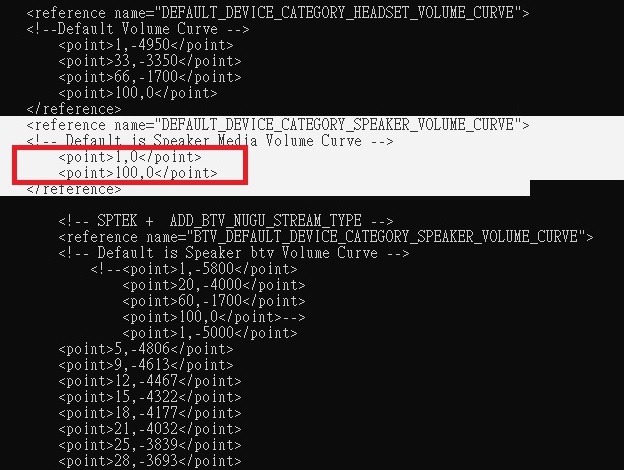
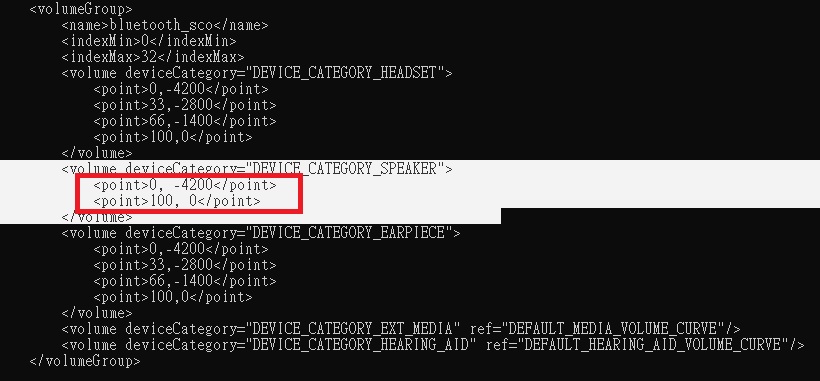
Hi River, When i check, each table is used for BT and speaker. Please check attached image and below file. device/synaptics/sequoia/audio_policy_engine_stream_volumes_ai2_max.xml 스크린샷 2022-03-03 오전 11.39.19.png (256,166 bytes) |
|
|
Hi Wooshin, In my test, I only can change BT earphone audio volume with UI volume bar when I modified "DEFAULT_DEVICE_CATEGORY_SPEAKER_VOLUME_CURVE" of /vendor/etc/audio_policy_engine_default_stream_volumes.xml. The attached pictures are what I did the test:. 1.volume_curve_test1.jpg: Change "DEFAULT_DEVICE_CATEGORY_SPEAKER_VOLUME_CURVE" of /vendor/etc/audio_policy_engine_default_stream_volumes.xml to make UI Vol 1~32 has max volume. 2.volume_curve_test2.jpg: Change "DEVICE_CATEGORY_SPEAKER" of /vendor/etc/audio_policy_engine_stream_volumes_ai2_max.xml to make max and min Vol has different values. With above change, the BT earphone will not change when I change UI Volume bar for IPTV channel and Youtube. So I think the "DEVICE_CATEGORY_SPEAKER" is not applied to BT audio path. PS:Based on image in http://altserver01.iptime.org/release_by_fxn/swan_nightly/SD_IMG/BFX-UA300_20220304_SD_v532r17_D406/ volume_curve_test1.jpg (98,373 bytes) volume_curve_test2.jpg (84,258 bytes) |
|
|
Hi, River, BT earphone and Speaker used different volume table. // frameworks/av/services/audiopolicy/managerdefault/AudioPolicyManager.cpp //Manufacturer change DB Audio_policy_engine_default_stream_volumes.xml if (getDeviceConnectionState(AUDIO_DEVICE_OUT_BLUETOOTH_A2DP, "") == AUDIO_POLICY_DEVICE_STATE_AVAILABLE){ gain = getStreamVolumeDB(AUDIO_STREAM_BLUETOOTH_SCO, index, device); ALOGI("%s: gain of BLUETOOTH_SCO gain volume_index : %d gain : %f", __func__, index , gain); } else { gain = getStreamVolumeDB(AUDIO_STREAM_BTV, index, device); } So, you can adjust BT earphone volume without any impact to Speaker volume. I modified the audio_policy_engine_stream_volumes_ai2_max.xml and I can change the volume level. And, also I can hear changing audio volume level when I connect the BT earphone under IPTV and Youtube. You can modify the volumeGroup name is "bluetooth_sco" and deviceCategory is DEVICE_CATEGORY_SPEAKER. Please adjust volume level refer to the AI2 device. Thank you. |
|
|
Hi Sangmin, Thanks for you analysis. Please see my reply. 1.The "gain" is only apply to set_btv_media_volume() and I think the final volume is not decided by it. Please see below comments in "<----" // frameworks/av/services/audiopolicy/managerdefault/AudioPolicyManager.cpp status_t AudioPolicyManager::setStreamVolumeIndex(audio_stream_type_t stream, int index, audio_devices_t device) { ...... if (getDeviceConnectionState(AUDIO_DEVICE_OUT_BLUETOOTH_A2DP, "") == AUDIO_POLICY_DEVICE_STATE_AVAILABLE){ gain = getStreamVolumeDB(AUDIO_STREAM_BLUETOOTH_SCO, index, device); ALOGI("%s: gain of BLUETOOTH_SCO gain volume_index : %d gain : %f", __func__, index , gain); } else { gain = getStreamVolumeDB(AUDIO_STREAM_BTV, index, device); } int ret = set_btv_media_volume(index, gain); <---- It looks lilke the gain only apply to btv media. But there is no source code for it. So, I do not know what will this func do. ............. return setVolumeIndexForAttributes(attributes, index, device); <---- I think the final volume is decided by this line and it refer to "DEFAULT_DEVICE_CATEGORY_SPEAKER_VOLUME_CURVE" } 2. Could you test my settings in two pictures in 0001435:0009544 ? And check if you could adjust the volume in BT mode or not? (You can use the following two configuration files and just push it to /vendor/etc/ and then reboot (to reload it) to do the same test as my.) In your test, if you only change "bluetooth_sco" and deviceCategory "DEVICE_CATEGORY_SPEAKER", the audio sound will change when you press volume key. But it is because it refers volume table in "DEFAULT_DEVICE_CATEGORY_SPEAKER_VOLUME_CURVE" of /vendor/etc/audio_policy_engine_default_stream_volumes.xml. That why I fix 100 and 0 volume to 0(max) as volume_curve_test1.jpg in 0001435:0009544 to do the test. Please do the test as I do to see if you still can change the volume or not. |
|
|
Hi, River, Answer #1 You're right. set_btv_media_volume -> it will affect to native player from SPTEK. setVolumeIndexForAttributes -> it will affect to android player such as OMX player. Answer #2 I got a misunderstanding. When I change the audio_policy_engine_stream_volumes_ai2_max.xml for bluetooth_sco, it only affected when the native player is used. So, when I play the Live channel, I can hear the audio volume level was adjusted. For Youtube, the audio volume level was same even I modify the audio_policy_engine_stream_volumes_ai2_max.xml for bluetooth_sco. And, for Youtube, the volume level was louder then live channel, so I was misunderstand that the volume level was adjusted also. For conclusion, 1. Please adjust the audio_policy_engine_stream_volumes_ai2_max.xml for bluetooth_sco. It will only affects under live channel. 2. For Youtube, please keep current status. To change volume level for BT headset during Youtube, I guess you should modify the Speaker volume table. But, we don't want to change main volume table. I will discuss it internally. |
|
|
HI Sangmin, I try to modify 2 files that change the audio_policy_engine_stream_volumes_ai2_max.xml for bluetooth_sco. I think the change of this curve is subjective. And also we have only few living channels to test that we streaming it locally. Could you help to test the two modification in the zip and give us which one you prefer? 1.folder 1-1200: Change min to around -1200. (0=-5300 is for mute) -<volume deviceCategory="DEVICE_CATEGORY_SPEAKER"> <point>0,-5300</point> <point>1,-1200</point> <point>100,0</point> </volume> 2.folder 1-1800: Change min to around -1800. (0=-5300 is for mute) -<volume deviceCategory="DEVICE_CATEGORY_SPEAKER"> <point>0,-5300</point> <point>1,-1800</point> <point>100,0</point> </volume> |
|
|
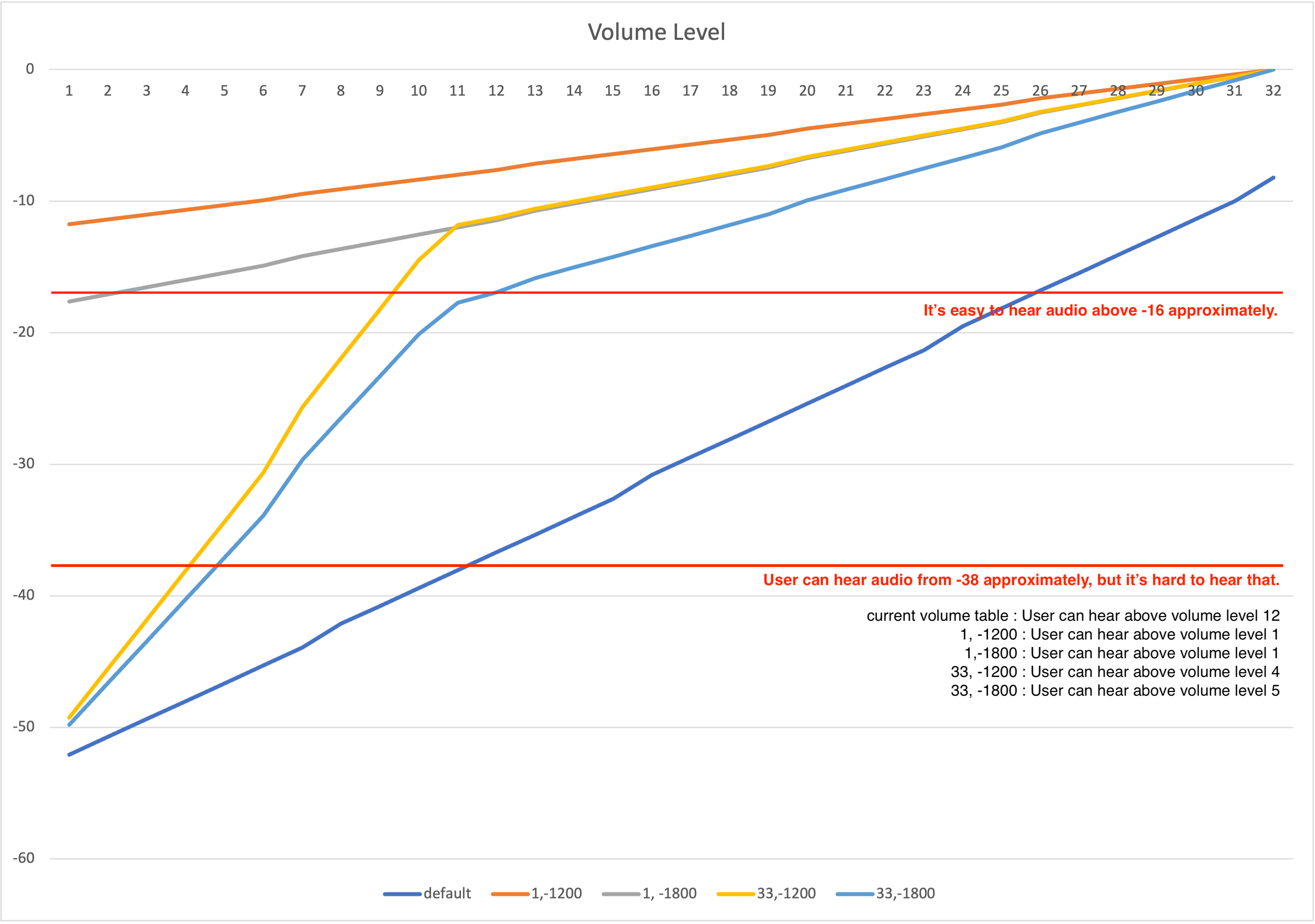
Hi, River, I tested with several volume tables, followings are the tested tables and I added volume table C and D. --------------------------------------------------------------------------------- default volume table : current volume table volume table A : 1,-1200 volume table B : 1,-1800 volume table C : 33, -1200 volume table D : 33, -1800 --------------------------------------------------------------------------------- User can hear audio when the gain value is set at least -38, but it's hard to hear that. And, it's easy to hear audio when the gain value is set above -16 approximately. So, when I use default volume table, I should set the volume level above 25 to hear audio well. And, volume table A and B, it's difficult to feel the changing of volume level when user try to change volume. As you know, the same volume index was used for main speaker and bluetooth device. So, if I set big volume level for bluetooth devices, then user will hear very loud audio from speaker when the bluetooth device was disconnected. For conclusion, I suggest to apply volume table D. Not only user can feel the changing volume level when the user try to change volume, but also user can hear audio with appropriate volume level. Please let me know if there is any problem on above description. Thank you. |
|
|
And, please refer to the attached picture. It will help to understand my description. |
|
|
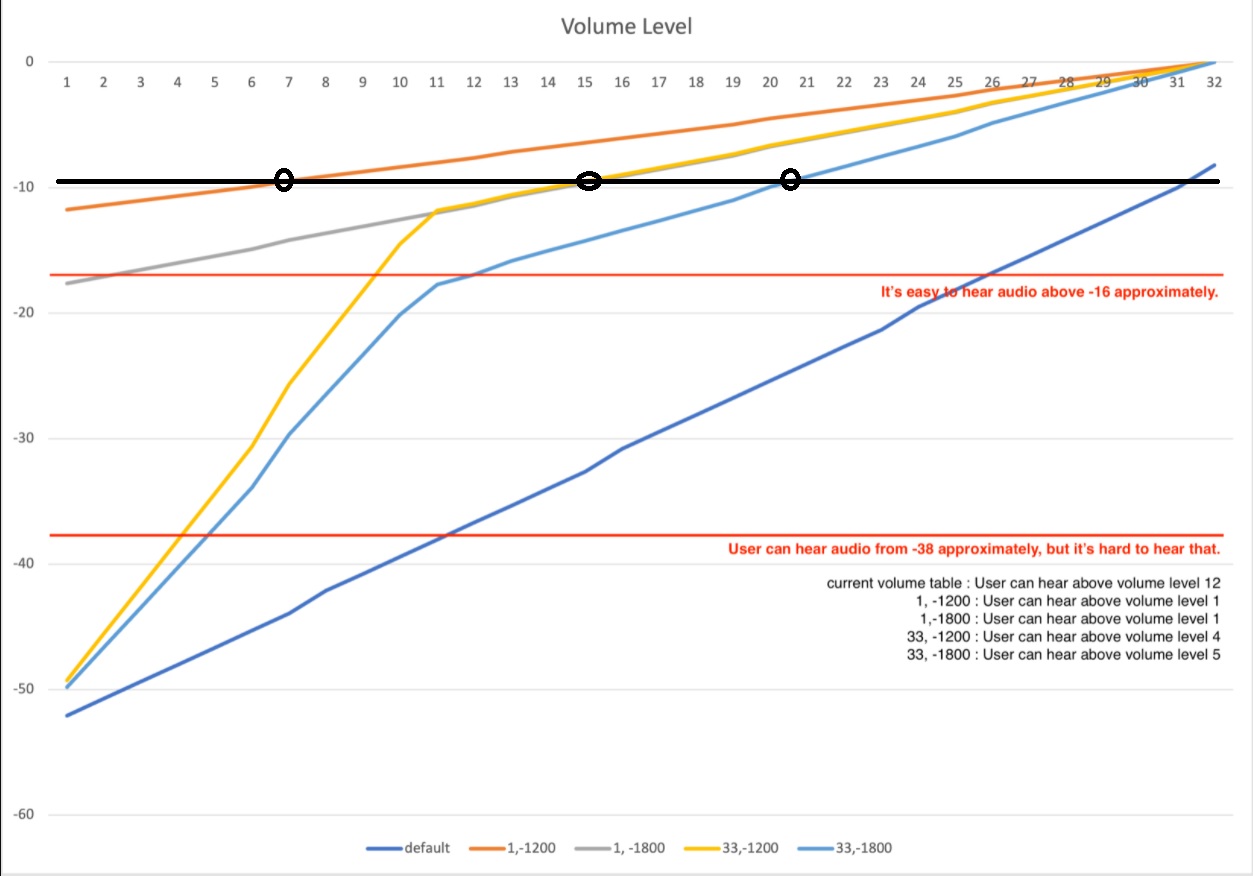
Hi Sangmin, As you know, the same volume index was used for main speaker and bluetooth device. So, if I set big volume level for bluetooth devices, then user will hear very loud audio from speaker when the bluetooth device was disconnected. >>As my personal opinion, I think this is a design issue. I think BT should has it's own volume index (The UI Volume bar shows bluetooth icon). And BTV should has it's own volume index(for example, no BT connected case. The UI Volume bar shows "BTV") The proper way should store the original volume index before BT connected. And restore this volume index after BT disconnected. Just like the NUGU, NUGU has it's own volume index. If BT and BTV does not have each own volume index as described above, I think even volume table D can not avoid big volume issue while disconnecting bluetooth device. For example, user may adjust low volume to 1 in the midnight to avoid affecting sleeping family member. And user then connects the BT earphone, and adjust volume level to 18. Then user disconnect BT earphone, the volume level will still in 18 and main speaker will have loud sound. Also, you can see the below picture, the black line has the same volume output for BT earphone. But the volume index is different. As you can see, table D has bigger Volume index 21. It will cause more bigger sound from speaker when BT earphone disconnected. volume table A: Volume index is 7 on same black line. volume table D: Volume index 21 on same black line. Same_Volume_To_Volume_Index.jpg (137,781 bytes) |
|
|
Hi Sangmin, Above is only my personal opinion, you can discuss with Wooshin. If BT and BTV volume can not be separated and you think Table D is more proper, then we will follow your decision. |
|
|
Hi, River, Yes, you're right. The best way is separate the volume index for speaker and bluetooth_sco device. But, I got the feedback from SPTEK that it's not possible. So, SPTEK added a workaround that applying another volume table when the bluetooth device is connected. Now, I think we got the same understand about this issue. I will discuss about this with Wooshin, and let you update the final decision to apply the volume table or not. Thank you. |
|
|
Hi, River, I discussed with Wooshin about this. Please apply the volume table D I uploaded. We can't avoid volume level issue without separating the volume index for speaker and bluetooth_sco device. Apply the volume table and let's observe the user's feedback. Finally, please commit the volume table with Jira ticket id(BTVV-4099). Thank you. |
|
|
Hi, River, I want to discuss about pairing Airpods again. I tested to connect Airpods with SWAN, but it's difficult to pair it. The Airpods wasn't displayed in possible list to pair. Sometimes the Airpods was displayed but most of tries I can't see in list. How about your test? Can you see the Airpods in possible list to pair every time? Could you please check it? I think this issue is not related with Airpods version. Thank you. |
|
|
HI Sangmin, Volume Table D is committed: Author: river wong <river.wong@fii-foxconn.com> Date: Wed Mar 16 09:50:37 2022 +0800 [BTVV-4099] Adjust BT volume table to increase volume of BT earphone or BT speaker for BTV Live IPTV and VOD. |
|
|
Hi Sangmin, For the Airpods wasn't displayed in possible list to pair, I will test it by using the Airpods we can get to test. |
|
|
Hi Sangmin, I can reproduce that sometimes airpod is not in the scan list in our office environment. The reason is because the Android BT stack implementation. If the test environment has many BLE and Classic BT devices, there is possiblity that airpod does not appear in scan list. According the current Android BT stack design, it will use a 40 entries DB to keep the processed BT MAC of BLE and Classic BT devices. If the DB is full and it will remove oldest one and add new one at the same entry. Becasue airpod will report it's self as a BLE and a Classic BT devices(A2DP). And airpod has same BT MAC for both BLE and Classic BT device. So, if airpod BLE device is scanned first and then somehow the DB is full, it will removed it and think it is processed. Then if airpod Classic BT device is scanned, Android BT stack will think it is handled and will not show in scan list. I think it is a huge work to correctly fix it because it is related to orignal Android BT stack design about the scan process. So, I suggest to increase the DB entery from 40 to 250 to wordaround it. Becasue I think in most user's home, it should not have more than 250 BT devices. I build a test image with this modifiction. Please try it and if you still can not be scanned, please help to capture logcat with this test image to me. http://altserver01.iptime.org/release_by_fxn/swan_test_image/20200331_Airpod_scan_issue/ Please also use the following steps to test: 1.Long press back button of airpod case and wait the led to flash. 2.Then start to scan in SWAN. |
|
|
Hi, River, I think the issue which is not displayed in the scan list is extremely improved. I am always able to see the airpod in scan list. But, when I try to connect the airpod, the airpod was connected and then I can see the message "Couldn't pair". It's not reproduced every time but I can see many times. Please refer to the attached video. IMG_1673.MOV (130,396,970 bytes) |
|
|
Hi Sangmin, Yes, I can reproduce "Couldn't pair". When it shows "Couldn't pair" and you leave the setting and then check it again at android settings, it will shows connected. I think it will take more time to debug it. |
|
|
Hi Sangmin. Regarding the "Cloudn't pair", could you check if the BT is reconnected after you see the "Couldn't pair'? I think so far we can not fix it. |
|
|
Hi, River, The BT was connected although there was "Couldn't pair" messages. Customers feel weird about this operation. And, if you can't fix it, could you please let me know why? I should explain to SKB manager about this. Thank you. |
|
|
Hi Sangmin, I think we should try to find any way to fix it if you think user will feel weird. But please understand it will take sometime to fix it. |
|
|
Hi, River, Ok, I understood it and could you please check following questions? Q1. Is this patch able to apply to the main branch? Could you please check possibility any side effect or Google certification failure? Q2. I think Smart3 has same issue it's hard to search airpod from STB. Could you please check Smart3 has same issue or not? And, is it possible to apply the same patch to Smart3? Q3. About "Couldn't pair" message issue, I understood you need time to fix it. So, do you have plan to fix or check this issue? Thank you. |
|
|
Hi Sangmin, Q1: For the change about DB entery from 40 to 250, it can apply to main branch. I think it should not related to Google Certification. Q2: As I remember, I tested Eagle(Smart3) for the same issue. But I can not see the same issue as SWAN about not able to scan airpod. I check the BT scan reply message, Eagle is different with SWAN (SWAN uses extended scan response format that can aggregate many scan results in one packet). That's why I think Eagle does not have this issue. Could you check if you can see the same issue on Smart3 first? Q3: Currently, I am dealing with mantis1455 about the BTF 6 level APIs. After i finished it, I will give you a schedule. |
|
|
Hi, River, Q1. Ok, please apply it to main branch. Q2. For Smart3, I will test again and let you know the result. I didn't find the way to enter pairing mode on Airpod, so it's difficult to measure the exact success rate. Q3. Ok, please update the schedule when you are available. Thank you. |
|
|
Hi Sangmin, For Q2, there is a button in the back of airpod case. Put the airpod earphone in the case and Just long press the button and wait for the led of airpod blinking. Then airpod is in pairing mode. |
|
|
Hi Sangmin, For Q1, the workaround, it is commited. commit b2a8c2bdf4c1654eeec52588760a2f7d2a1e665a (HEAD, skb/BFX-UA300_5.3.2, m/BFX-UA300_5.3.2) Author: river wong <river.wong@fii-foxconn.com> Date: Mon Apr 25 17:48:10 2022 +0800 Workaround for Airpods sometimes does not show in scan list when there are many BT devices. |
|
|
Hi, River, I tested scanning the Airpod with Smart3 and SWAN. [ Test Procedure ] 1. Long press the button of Airpod and the Airpod's led is blinking 2. Enter the "Add accessory" menu ( Settings -> Remotes & Accessories -> Add accessory ) 3. Keep this menu until the Airpod's led blinking is done ( It takes about 1 minutes ) 4. Check the Airpod is scanned successfully or not [ Test Result ] 1. SWAN - before apply the patch ( 20220425 daily build ) -> Success rate 1/10 2. SWAN - after apply the patch ( 20220426 daily build ) -> Success rate 9/10 3. Smart3 - 15.533.4 -> Success rate 5/10 Smart3 can scan the Airpod better than previous firmware of SWAN. But, the result was worse than current firmware of SWAN. Could you please share your test result? Thank you. |
- yk.jung ( (ALTech) Younkwang Jung ) developer